Receipts fade.Your records won’t.
Take a photo of a receipt. ScanTax reads it, checks the sums and files it on the right line of your tax return. Your records are kept safe on your phone.
Coming soon to theApp Store
Free for 7 days, then £39.99 a year. Cancel any time in your Apple Account.

How it works
Three steps. Most receipts stop at the first.
Snap it
Take a photo, pick one from Photos or scan a stack. The AI reads the shop, date, items, total and VAT.
Camera, Photos or a stack
Answer if it asks
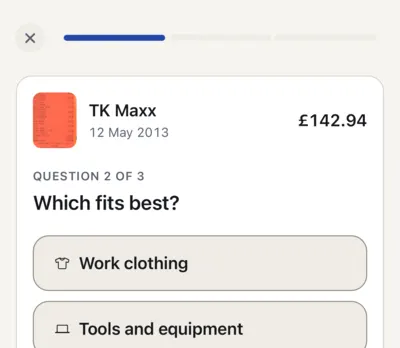
It checks that the lines add up and picks the category. If it isn’t sure, it asks one plain question.
Only when it’s unsure
Export at tax time
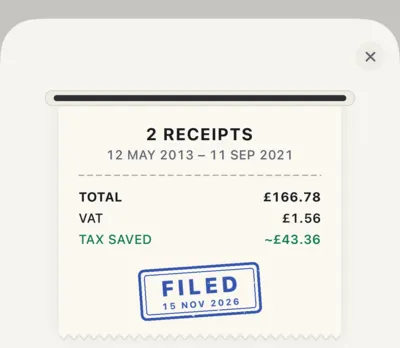
Send a report by form line, or a pack of CSV and photos for your accountant.
PDF, CSV and photos


What it does
Kept like a bookkeeper’s ledger, without the bookkeeping.
Filed on the right line of your tax form
- Train ticket£64.20, goes in Box 12
- Van fuel£60.00, goes in Box 12
- Phone bill£25.00, goes in Box 18
- Printer ink£18.99, goes in Box 18
- Insurance£9.50, goes in Box 14
- Box 12Car, van and travel£124.20Car, van and travel
- Box 18Phone and office costs£43.99Phone and office costs
- Box 14Rent, power and insurance£9.50Rent, power and insurance
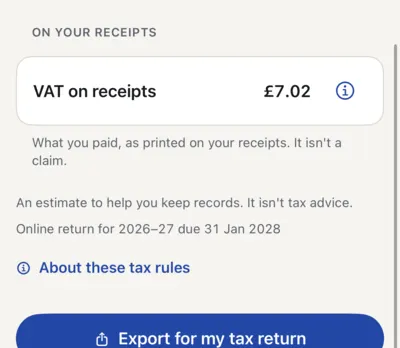
- VAT on each receipt
- Estimated tax saved
- Business share of mixed costs
- Past tax years too
How ready your year is
One meter shows what is left before you file.
3 quick questions · Close October
It checks, then asks
It adds up every line. If a number is unclear, it asks you once.
Check this
“Is the total £70.98?”
Your next deadline, in view
Home shows it with the date. Pro also reminds you two weeks before.
2025–26 returnReturn and payment due, 2027
Ready for your accountant
- Tax report by form linePDF
- Every receipt, itemisedCSV
- Receipt photosZIP
Read by AI, or typed by you
- Shop
- Date
- Items
- Total
- VAT
Or type a receipt in by hand, as many as you like.
Built around your country’s rules
The local tax year, categories and sales-tax name for these 12 countries. Anywhere else, simple categories and a tax year you choose.
 United Kingdom
 Ireland
 United States
 Canada
 Australia
 New Zealand
 Germany
 France
 Spain
 Italy
 Portugal
 Netherlands
The app follows your phone’s language: English, German, French, Spanish, Italian, Portuguese (Portugal and Brazil) and Dutch. Each country above links to its tax guide: what you can claim, where it goes and the deadlines.
Privacy
Your receipts stay on your phone.
No account to make. No ads in the app, and no tracking across other apps or websites.
Your phone
Your receipts, photos and totals live here, with a copy in your own iCloud.
The AI reader
Reads the photo and sends the details back. It is asked not to keep the photo or learn from it.
Our server keeps
- An install number
- How many reads you have left
- Photos (never kept)
- Shop names (never kept)
- Amounts (never kept)
- Anything you typed (never kept)
Before your first scan, the app names the AI service and asks. Say no, and you can type receipts in by hand.
This website counts visits, and measures our own ads, only if you agree.
Pricing
Try ScanTax Pro free for 7 days.
Pay yearly or monthly. You subscribe in the iPhone app with your Apple Account, and you can cancel any time.
Everything in Pro
- 100 receipts read by AI each month
- 50 extra receipts with your first payment, kept until used
- Each one filed on the right line of your tax form
- A tax report and an export for your accountant
- Deadline reminders and a year in review
How the yearly trial works
- TodayFull access, free
- Day 5We remind you, if you allow notifications
- Day 7£39.99 for the year, unless you cancel
Choose how to pay
Yearly£39.99a year
About £3.33 a month. You save £31.89 on paying monthly.
Monthly£5.99a month
That is £71.88 over a year. No free trial.
Coming soon to theApp Store
You choose a plan in the app, and Apple takes the payment.
Catch-up packs · add to Pro any time
For a shoebox of old receipts or a busy month. Bought once, and they never expire.
- £3.9950 receipts
- £9.99200 receipts
Yearly: free for 7 days, then £39.99 a year. Monthly: £5.99 a month. Both renew automatically until you cancel in your iPhone’s Settings, at least 24 hours before the renewal date. The free trial is for new subscribers only, and the monthly allowance does not roll over. Prices are UK App Store prices including VAT; they differ by country, and Apple shows the price you pay before you confirm.
Questions
What people ask before they trust an app with receipts.
What if the AI reads a receipt wrong?
It can happen. ScanTax checks that the lines add up to the total. If something looks off, it reads the receipt again with a stronger model. If it is still unsure, it marks the receipt “Check this” and asks you. You can edit anything. You are responsible for your return, so look over the totals before you file.
Who sees my receipts?
Your receipts, photos and totals are stored on your iPhone, with a copy in your own iCloud. They are not stored on our servers.
When you scan, the photo goes to an AI service to be read, and the details come straight back. Before your first scan, the app names that service and asks your permission. You can say no and type receipts in by hand. The privacy policy has the full details.
Is ScanTax tax advice?
No. ScanTax keeps your records and files each receipt where it most likely belongs under your country’s rules. It does not file your return or tell you what to claim. Any tax saving it shows is an estimate based on what you told it. Check with your tax office or an accountant before you file.
Can I bring in records from another app?
Yes. Export a CSV or Excel (.xlsx) file from another app, your bank or a spreadsheet, then choose Settings › Data and backup › Import receipts. ScanTax works out the columns, sorts the rows into categories and shows you the result before anything is saved. Importing is part of Pro (the free trial included), and the AI sorts up to 5,000 rows a day. You can undo an import later.
Can I try it before I pay?
Yes. The yearly plan starts with a 7-day free trial for new subscribers. There is no free plan, and the monthly plan has no trial. Cancel in your iPhone’s Settings at least 24 hours before the trial ends and you are not charged. If you do nothing, £39.99 is charged to your Apple Account, and the plan renews each year until you cancel. The app shows the exact price and date before you confirm.
How do I cancel Pro?
In your iPhone’s Settings › Apple Account › Subscriptions, at least 24 hours before it renews. On the yearly plan’s 7-day free trial, cancel at least 24 hours before the trial ends and you are not charged.
Can I get a refund?
Apple handles every App Store refund, so Apple decides, not us. If you pay for Pro, the app’s Settings › Plan and receipts › Request a refund opens Apple’s refund form for you.
What happens to my receipts if I stop paying?
Nothing is deleted. Every receipt stays on your iPhone and in your own iCloud, and you can still view, search and edit them, see the report and export a CSV file. Adding new receipts and the PDF and accountant exports stop until you subscribe again. Unused catch-up and bonus receipts stay on your account for then.
Does a failed scan use up a receipt?
No. A receipt counts only when it is read. A photo it cannot read, or one that turns out not to be a receipt, costs nothing.
Do catch-up receipts expire?
No. Catch-up receipts you buy are yours until you use them, so a pack is there for a shoebox of old receipts or a busy month. They add to Pro and are read while you subscribe. Pro’s monthly allowance of 100 receipts does not roll over.
Do I need an account?
No. There is no sign-up and no password. Your purchases belong to your Apple Account, so you can restore them on a new iPhone.
Which devices does it work on?
The app needs an iPhone with iOS 26 or later. It is not available for iPad or Android.
My country isn't on the list. Can I still use it?
Yes. Anywhere else, ScanTax saves and totals your receipts with simple categories and a tax year you choose. It cannot match them to your country’s tax form.
More help is on the support page.
Start with your next receipt.
Try Pro free for 7 days on the yearly plan. No account to make, and you can cancel any time in your Apple Account.
Coming soon to theApp Store